
Overview
hTech AI – Agent Assist is a sidebar tool inside the WHMCS ticket view that helps support staff reply faster and more consistently. It does not send messages automatically. Instead, it analyzes the current ticket, shows a quick summary, and provides a suggested reply that agents can review, edit, and send.
Where Agent Assist Appears
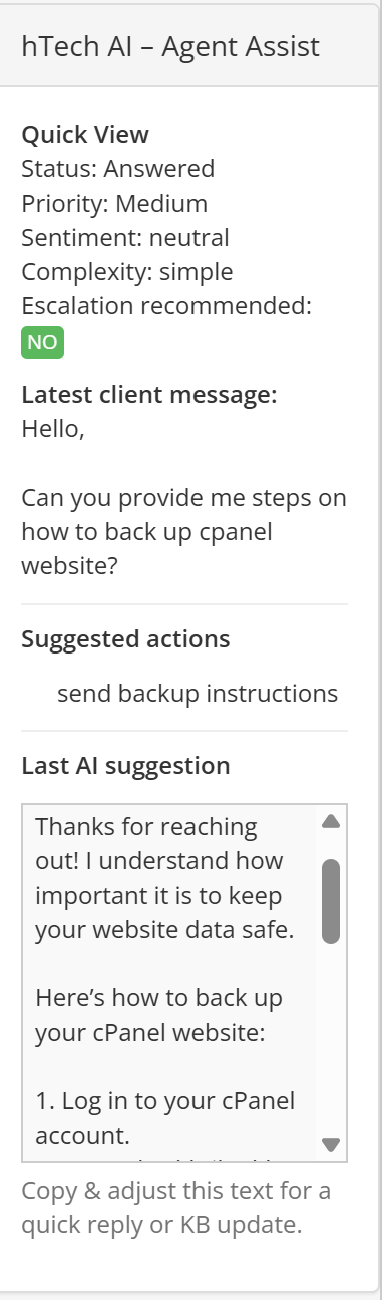
When you open a ticket in the WHMCS admin area, you will see a panel titled "hTech AI – Agent Assist" on the left-hand side (or in the ticket sidebar, depending on your template). This panel updates each time a new client message is received.
Quick View Section
The top of the Agent Assist panel shows a Quick View summary of the ticket:
- Status – Current ticket status (for example: Open, Answered, In Progress).
- Priority – The ticket’s current priority (Low, Medium, High).
- Sentiment – The detected tone of the latest client message (positive, neutral, or negative).
- Complexity – How difficult the AI believes the request is (simple, normal, complex).
- Escalation recommended – Shows YES or NO depending on whether the AI thinks a human should escalate or review the case more carefully.
This section helps agents quickly understand how serious or urgent the ticket may be before reading the entire conversation.
Latest Client Message
The next section displays the Latest client message. This shows the most recent customer reply so the agent can see the exact question the AI used when preparing its suggestion.
This makes it easy to review the context without scrolling through the full ticket history.
Suggested Actions
The Suggested actions line provides a short recommendation from the AI about what the agent should do next.
Examples:
- "send backup instructions"
- "confirm billing details"
- "ask for error screenshot"
This is meant to guide the agent toward the next logical support step.
Last AI Suggestion
The bottom section is labeled Last AI suggestion. This area contains a full draft reply written by the AI based on the customer’s latest message, your SOPs, and your Knowledgebase.
Typical content includes:
- A friendly greeting
- A clear answer or troubleshooting steps
- Numbered instructions when needed
- A closing line that matches your support style
The suggestion is shown in a scrollable box so agents can read and copy it easily.
How Agents Should Use Agent Assist
Agent Assist is a helper tool, not an automatic responder. Recommended workflow:
- Read the Quick View and Latest client message.
- Review the Suggested actions for what the AI recommends.
- Read the Last AI suggestion carefully.
- Copy the suggestion into the ticket reply editor.
- Edit the text as needed to match the situation.
- Send the reply to the customer.
Agents should always review and adjust the text rather than sending it blindly.
Benefits for Support Staff
- Faster responses to common questions.
- Consistent tone and structure across replies.
- Helpful reminders of next steps and best practices.
- Less typing for everyday “how do I…” style queries.
When Agents Should Override the Suggestion
Agents should modify or ignore the AI suggestion when:
- The customer is angry or very upset.
- The issue involves billing disputes, legal questions, or sensitive topics.
- Details in the suggestion do not match the client’s exact situation.
- The agent has more up-to-date information than the SOP or KB.
In these cases, staff should write a manual reply or heavily edit the AI’s draft.
Relation to Other AI Features
Agent Assist works together with other module features:
- It uses Ticket Insights to show sentiment, complexity, and escalation recommendations.
- It respects SOPs and Knowledgebase settings for the department.
- It does not post directly to the ticket; only the agent decides what is sent.
Summary
hTech AI – Agent Assist is a sidebar assistant for your support team. It reads the latest client message, analyzes the ticket, and provides a ready-to-edit reply along with a quick status overview. By copying, adjusting, and sending these suggestions, agents can work faster while maintaining full control over every customer response.
If your team would like additional training on using Agent Assist effectively, feel free to open a support ticket.